

|
При нажатии на Сумма в примере ArbitraryMethod из Лекция 7, VS 2013 выдается ошибка: Необработанное исключение типа "System.InvalidOperationException" в System.Windows.Forms.dll Дополнительные сведения: Недопустимая операция в нескольких потоках: попытка доступа к элементу управления "lblResult" не из того потока, в котором он был создан. Затем: Необработанное исключение типа "System.InvalidOperationException" в mscorlib.dll Дополнительные сведения: Для каждой асинхронной операции метод EndInvoke может вызываться только один раз. |
Инспектор
Вы можете этот курс.
Опубликован: 11.09.2006 | Уровень: специалист | Доступ: платный
Лекция 10:
Безопасность Windows-форм
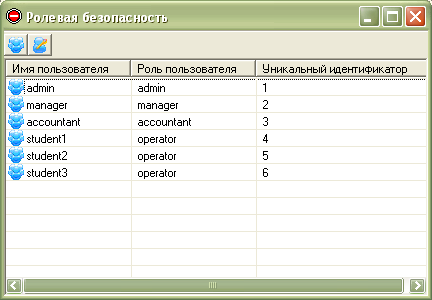
Теперь займемся пользовательским интерфейсом программы и привязкой обработчиков. Все приложения, которые мы рассматривали в предыдущих лекциях, я сопровождал описанием дизайна форм и не указывал в листинге область Windows Form Designer generated code. Сейчас я поступлю наоборот — я приведу код, генерируемый средой, и изображения формы, а вы, скопировав код, относящийся к дизайну, разберетесь с элементами, которые были использованы для создания интерфейса. Итак, главная форма программы будет иметь следующий вид (рис. 10.14):
В окне Solution Explorer переименуйте Form1.cs в MainForm.cs, добавьте на форму элемент управления ImageList и поместите в коллекцию две иконки (на рис. 10.15 эти иконки были использованы для кнопок панели инструментов).
Листинг формы MainForm:
using System;
using System.Drawing;
using System.Collections;
using System.ComponentModel;
using System.Windows.Forms;
using System.Data;
using System.Threading;
using System.Xml;
using System.Xml.XPath;
using System.IO;
namespace CustomSecurity
{
/// <summary>
/// Главная форма.
/// </summary>
public class MainForm : System.Windows.Forms.Form
{
private System.Windows.Forms.ToolBarButton btnViewUsers;
private System.Windows.Forms.ToolBarButton btnEditUsers;
private System.Windows.Forms.ImageList toolBoxIcons;
private System.Windows.Forms.ToolBar toolBar;
private System.Windows.Forms.ListView lstViewUsers;
private System.Windows.Forms.ColumnHeader colUserName;
private System.Windows.Forms.ColumnHeader colUserRole;
private System.Windows.Forms.ColumnHeader colUserId;
private System.ComponentModel.IContainer components;
public MainForm()
{
InitializeComponent();
}
/// <summary>
/// Clean up any resources being used.
/// </summary>
protected override void Dispose( bool disposing )
{
if( disposing )
{
if (components != null)
{
components.Dispose();
}
}
base.Dispose( disposing );
}
#region Windows Form Designer generated code
/// <summary>
/// Required method for Designer support — do not modify
/// the contents of this method with the code editor.
/// </summary>
private void InitializeComponent()
{
this.components = new System.ComponentModel.Container();
System.Resources.ResourceManager resources = new System.Resources.ResourceManager(typeof(MainForm));
this.toolBar = new System.Windows.Forms.ToolBar();
this.btnViewUsers = new System.Windows.Forms.ToolBarButton();
this.btnEditUsers = new System.Windows.Forms.ToolBarButton();
this.toolBoxIcons = new System.Windows.Forms.ImageList(this.components);
this.lstViewUsers = new System.Windows.Forms.ListView();
this.colUserName = new System.Windows.Forms.ColumnHeader();
this.colUserRole = new System.Windows.Forms.ColumnHeader();
this.colUserId = new System.Windows.Forms.ColumnHeader();
this.SuspendLayout();
//
// toolBar
//
this.toolBar.Buttons.AddRange(new System.Windows.Forms.ToolBarButton[] {
this.btnViewUsers,
this.btnEditUsers});
this.toolBar.DropDownArrows = true;
this.toolBar.ImageList = this.toolBoxIcons;
this.toolBar.Location = new System.Drawing.Point(0, 0);
this.toolBar.Name = "toolBar";
this.toolBar.ShowToolTips = true;
this.toolBar.Size = new System.Drawing.Size(424, 28);
this.toolBar.TabIndex = 0;
this.toolBar.ButtonClick += new System.Windows.Forms.ToolBarButtonClickEventHandler(this.toolBar_ButtonClick);
//
// btnViewUsers
//
this.btnViewUsers.ImageIndex = 0;
this.btnViewUsers.Tag = "view";
this.btnViewUsers.ToolTipText = "Вывести список пользователей";
//
// btnEditUsers
//
this.btnEditUsers.ImageIndex = 1;
this.btnEditUsers.Tag = "edit";
this.btnEditUsers.ToolTipText = "Редактировать роль пользователя";
//
// toolBoxIcons
//
this.toolBoxIcons.ImageSize = new System.Drawing.Size(16, 16);
this.toolBoxIcons.ImageStream = ((System.Windows.Forms.ImageListStreamer)(resources.GetObject("toolBoxIcons.ImageStream")));
this.toolBoxIcons.TransparentColor = System.Drawing.Color.Transparent;
//
// lstViewUsers
//
this.lstViewUsers.Columns.AddRange(new System.Windows.Forms.ColumnHeader[] {
this.colUserName,
this.colUserRole,
this.colUserId});
this.lstViewUsers.Cursor = System.Windows.Forms.Cursors.Hand;
this.lstViewUsers.Dock = System.Windows.Forms.DockStyle.Fill;
this.lstViewUsers.FullRowSelect = true;
this.lstViewUsers.GridLines = true;
this.lstViewUsers.Location = new System.Drawing.Point(0, 28);
this.lstViewUsers.MultiSelect = false;
this.lstViewUsers.Name = "lstViewUsers";
this.lstViewUsers.Size = new System.Drawing.Size(424, 238);
this.lstViewUsers.SmallImageList = this.toolBoxIcons;
this.lstViewUsers.TabIndex = 1;
this.lstViewUsers.View = System.Windows.Forms.View.Details;
//
// colUserName
//
this.colUserName.Text = "Имя пользователя";
this.colUserName.Width = 125;
//
// colUserRole
//
this.colUserRole.Text = "Роль пользователя";
this.colUserRole.Width = 125;
//
// colUserId
//
this.colUserId.Text = "Уникальный идентификатор";
this.colUserId.Width = 175;
//
// MainForm
//
this.AutoScaleBaseSize = new System.Drawing.Size(5, 13);
this.ClientSize = new System.Drawing.Size(424, 266);
this.Controls.Add(this.lstViewUsers);
this.Controls.Add(this.toolBar);
this.Icon = ((System.Drawing.Icon)(resources.GetObject("$this.Icon")));
this.Name = "MainForm";
this.Text = "Ролевая безопасность";
this.Load += new System.EventHandler(this.MainForm_Load);
this.ResumeLayout(false);
}
#endregion
/// <summary>
/// The main entry point for the application.
/// </summary>
[STAThread]
static void Main()
{
Application.Run(new MainForm());
}
private void MainForm_Load(object sender, System.EventArgs e)
{
// Получаем имя пользователя.
LogInForm login = new LogInForm();
if(login.ShowDialog() != DialogResult.OK)
{
// Если пользователь отменил ввод имени, закрываем приложение
this.Close();
return;
}
try
{
// Создаем объекты IIdentity и IPrincipal
CustomIdentity identity = new CustomIdentity(login.txbUserName.Text);
CustomPrincipal principal = new CustomPrincipal(identity);
Thread.CurrentPrincipal = principal;
this.ValidateUser();
}
catch(Exception ex)
{
// Обрабатываем исключения и закрываем приложение.
MessageBox.Show("Во время выполнения приложения возникла ошибка: "+ex.Message, "Ошибка");
this.Close();
return;
}
}
/// <summary>
/// Изменяем пользовательский интерфейс в зависимости от роли пользователя.
/// </summary>
private void ValidateUser()
{
CustomPrincipal principal = Thread.CurrentPrincipal as CustomPrincipal;
if(principal.IsInRole("operator"))
{
// Если роль пользователя — operator, скрываем функциональность.
btnEditUsers.Enabled = false;
btnViewUsers.Enabled = false;
}
if(principal.IsInRole("manager"))
{
// Для роли пользователя manager скрываем возможности изменения роли пользователя.
btnEditUsers.Enabled = false;
}
}
private void toolBar_ButtonClick(object sender, System.Windows.Forms.ToolBarButtonClickEventArgs e)
{
// Проверяем, какая кнопка была нажата, и
// выполняем соответствующее действие.
switch(e.Button.Tag.ToString())
{
case "view":
this.ViewUsers();
break;
case "edit":
this.EditUser();
break;
}
}
/// <summary>
/// Выводим пользователей на экран.
/// </summary>
private void ViewUsers()
{
lstViewUsers.Items.Clear();
XmlTextReader xmlReader = new XmlTextReader("Users.xml");
xmlReader.WhitespaceHandling = WhitespaceHandling.None;
while(xmlReader.Read())
{
// Считываем данные из XML-файла, представляем их в виде
// строки элемента управления ListView
if(xmlReader["name"] == null)
continue;
ListViewItem item = new ListViewItem(new
string[]{xmlReader["name"], xmlReader["role"], xmlReader["id"]}, 0);
lstViewUsers.Items.Add(item);
}
xmlReader.Close();
}
/// <summary>
/// Изменяем выбранного пользователя.
/// </summary>
private void EditUser()
{
if(lstViewUsers.SelectedItems.Count == 0)
{
MessageBox.Show("Вы дожны выбрать пользователя.", "Сообщение приложения");
}
else
{
string userName = lstViewUsers.SelectedItems[0].Text;
EditUserForm edit = new EditUserForm(userName);
if(edit.ShowDialog() != DialogResult.OK)
return;
// Считываем новую роль.
string newRole = edit.cmbRole.SelectedItem.ToString();
// Обновляем файл XML новыми данными.
XmlDocument doc = new XmlDocument();
StreamReader reader = new StreamReader("Users.xml");
doc.LoadXml(reader.ReadToEnd());
reader.Close();
XmlElement root = doc.DocumentElement;
foreach(XmlNode child in root.ChildNodes)
{
if(child.Attributes["name"].Value == userName)
{
child.Attributes["role"].Value = newRole;
break;
}
}
doc.Save("Users.xml");
this.ViewUsers();
}
}
}
}
Листинг
10.7.
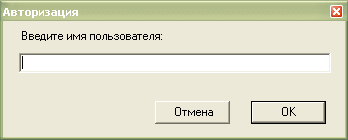
При запуске приложения доступ к главной форме будет блокироваться до прохождения авторизации (рис.рис. 10.16).
Добавьте новую Windows-форму в проект и назовите ее LoginForm.cs. Листинг этой формы:
using System;
using System.Drawing;
using System.Collections;
using System.ComponentModel;
using System.Windows.Forms;

namespace CustomSecurity
{
        /// <summary>
        /// Форма ввода имени пользователя.
        /// </summary>
        public class LogInForm : System.Windows.Forms.Form
        {
                // Обратите внимание на то, что модификатору доступа элемента
                // управления txbUserName  установлено  значение  public. Это сделано для того, чтобы
                // можно было из другой формы получить введенный в него текст.
                public System.Windows.Forms.TextBox txbUserName;
                private System.Windows.Forms.Button btnCancel;
                private System.Windows.Forms.Button btnOk;
                private System.Windows.Forms.Label lblUserName;
                /// <summary>
                /// Required designer variable.
                /// </summary>
                private System.ComponentModel.Container components = null;

                public LogInForm()
                {
                        //
                        // Required for Windows Form Designer support
                        //
                        InitializeComponent();

                        //
                        // TODO: Add any constructor code after InitializeComponent call
                        //
                }

                /// <summary>
                /// Clean up any resources being used.
                /// </summary>
                protected override void Dispose( bool disposing )
                {
                        if( disposing )
                        {
                                if(components != null)
                                {
                                        components.Dispose();
                                }
                        }
                        base.Dispose( disposing );
                }

                #region Windows Form Designer generated code

                private void InitializeComponent()
                {
                        this.txbUserName = new System.Windows.Forms.TextBox();
                        this.btnCancel = new System.Windows.Forms.Button();
                        this.btnOk = new System.Windows.Forms.Button();
                        this.lblUserName = new System.Windows.Forms.Label();
                        this.SuspendLayout();
                        //
                        // txbUserName
                        //
                        this.txbUserName.Location = new System.Drawing.Point(16, 32);
                        this.txbUserName.Name = "txbUserName";
                        this.txbUserName.Size = new System.Drawing.Size(312, 20);
                        this.txbUserName.TabIndex = 0;
                        this.txbUserName.Text = "";
                        //
                        // btnCancel
                        //
                        this.btnCancel.DialogResult = System.Windows.Forms.DialogResult.Cancel;
                        this.btnCancel.Location = new System.Drawing.Point(152, 80);
                        this.btnCancel.Name = "btnCancel";
                        this.btnCancel.TabIndex = 1;
                        this.btnCancel.Text = "Отмена";
                        //
                        // btnOk
                        //
                        this.btnOk.Location = new System.Drawing.Point(248, 80);
                        this.btnOk.Name = "btnOk";
                        this.btnOk.TabIndex = 2;
                        this.btnOk.Text = "ОК";
                        this.btnOk.Click += new System.EventHandler(this.btnOk_Click);
                        //
                        // lblUserName
                        //
                        this.lblUserName.Location = new System.Drawing.Point(16, 8);
                        this.lblUserName.Name = "lblUserName";
                        this.lblUserName.Size = new System.Drawing.Size(216, 24);
                        this.lblUserName.TabIndex = 3;
                        this.lblUserName.Text = "Введите имя пользователя:";
                        //
                        // LogInForm
                        //
                        this.AcceptButton = this.btnOk;
                        this.AutoScaleBaseSize = new System.Drawing.Size(5, 13);
                        this.CancelButton = this.btnCancel;
                        this.ClientSize = new System.Drawing.Size(342, 116);
                        this.Controls.Add(this.lblUserName);
                        this.Controls.Add(this.btnOk);
                        this.Controls.Add(this.btnCancel);
                        this.Controls.Add(this.txbUserName);
                        this.FormBorderStyle = System.Windows.Forms.FormBorderStyle.FixedToolWindow;
                        this.Name = "LogInForm";
                        this.StartPosition = System.Windows.Forms.FormStartPosition.CenterScreen;
                        this.Text = "Авторизация";
                        this.ResumeLayout(false);

                }
                #endregion

                private void btnOk_Click(object sender, System.EventArgs e)
                {
                        // Устанавливаем положительный  результат выполнения
                        // и закрываем форму.
                        this.DialogResult = DialogResult.OK;
                        this.Close();
                }
        }
}
Листинг
10.8.
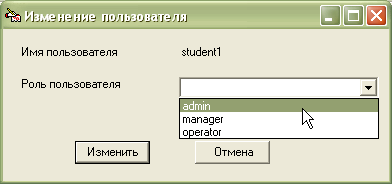
Последняя форма, которая будет использована в нашем проекте, — EditUserForm, изменяющая роль пользователей (рис. 10.17).
Листинг этой формы:
using System;
using System.Drawing;
using System.Collections;
using System.ComponentModel;
using System.Windows.Forms;

namespace CustomSecurity
{
        /// <summary>
        /// Форма изменения роли пользователя
        /// </summary>
        public class EditUserForm : System.Windows.Forms.Form
        {
                private System.Windows.Forms.Label lblName;
                private System.Windows.Forms.Label lblRole;
                public System.Windows.Forms.ComboBox cmbRole;
                private System.Windows.Forms.Label lblUserName;
                private System.Windows.Forms.Button btnCancel;
                private System.Windows.Forms.Button btnEdit;
                /// <summary>
                /// Required designer variable.
                /// </summary>
                private System.ComponentModel.Container components = null;
                private string UserName;
                // Обратите внимание на то, что у формы переопределен конструктор.
                // Это сделано для передачи форме имени пользователя,
                // роль которого необходимо изменить.
                public EditUserForm(string userName)
                {
                        UserName = userName;
                        InitializeComponent();
                }

                /// <summary>
                /// Clean up any resources being used.
                /// </summary>
                protected override void Dispose( bool disposing )
                {
                        if( disposing )
                        {
                                if(components != null)
                                {
                                        components.Dispose();
                                }
                        }
                        base.Dispose( disposing );
                }

                #region Windows Form Designer generated code
                /// <summary>
                /// Required method for Designer support — do not modify
                /// the contents of this method with the code editor.
                /// </summary>
                private void InitializeComponent()
                {
                        System.Resources.ResourceManager resources = new System.Resources.ResourceManager(typeof(EditUserForm));
                        this.lblName = new System.Windows.Forms.Label();
                        this.lblRole = new System.Windows.Forms.Label();
                        this.btnCancel = new System.Windows.Forms.Button();
                        this.btnEdit = new System.Windows.Forms.Button();
                        this.cmbRole = new System.Windows.Forms.ComboBox();
                        this.lblUserName = new System.Windows.Forms.Label();
                        this.SuspendLayout();
                        //
                        // lblName
                        //
                        this.lblName.Location = new System.Drawing.Point(16, 16);
                        this.lblName.Name = "lblName";
                        this.lblName.Size = new System.Drawing.Size(144, 23);
                        this.lblName.TabIndex = 1;
                        this.lblName.Text = "Имя пользователя";
                        //
                        // lblRole
                        //
                        this.lblRole.Location = new System.Drawing.Point(16, 48);
                        this.lblRole.Name = "lblRole";
                        this.lblRole.Size = new System.Drawing.Size(144, 23);
                        this.lblRole.TabIndex = 3;
                        this.lblRole.Text = "Роль пользователя";
                        //
                        // btnCancel
                        //
                        this.btnCancel.DialogResult = System.Windows.Forms.DialogResult.Cancel;
                        this.btnCancel.Location = new System.Drawing.Point(192, 112);
                        this.btnCancel.Name = "btnCancel";
                        this.btnCancel.TabIndex = 4;
                        this.btnCancel.Text = "Отмена";
                        //
                        // btnEdit
                        //
                        this.btnEdit.Location = new System.Drawing.Point(72, 112);
                        this.btnEdit.Name = "btnEdit";
                        this.btnEdit.TabIndex = 5;
                        this.btnEdit.Text = "Изменить";
                        this.btnEdit.Click += new System.EventHandler(this.button2_Click);
                        //
                        // cmbRole
                        //
                        this.cmbRole.DropDownStyle = System.Windows.Forms.ComboBoxStyle.DropDownList;
                        this.cmbRole.Items.AddRange(new object[] {
                                                                                                                 "admin",
                                                                                                                 "manager",
                                                                                                                 "operator"});
                        this.cmbRole.Location = new System.Drawing.Point(176, 48);
                        this.cmbRole.Name = "cmbRole";
                        this.cmbRole.Size = new System.Drawing.Size(200, 21);
                        this.cmbRole.TabIndex = 6;
                        //
                        // lblUserName
                        //
                        this.lblUserName.Location = new System.Drawing.Point(176, 16);
                        this.lblUserName.Name = "lblUserName";
                        this.lblUserName.Size = new System.Drawing.Size(200, 23);
                        this.lblUserName.TabIndex = 7;
                        //
                        // EditUserForm
                        //
                        this.AcceptButton = this.btnEdit;
                        this.AutoScaleBaseSize = new System.Drawing.Size(5, 13);
                        this.CancelButton = this.btnCancel;
                        this.ClientSize = new System.Drawing.Size(386, 152);
                        this.Controls.Add(this.lblUserName);
                        this.Controls.Add(this.cmbRole);
                        this.Controls.Add(this.btnEdit);
                        this.Controls.Add(this.btnCancel);
                        this.Controls.Add(this.lblRole);
                        this.Controls.Add(this.lblName);
                        this.FormBorderStyle = System.Windows.Forms.FormBorderStyle.FixedDialog;
                        this.Icon = ((System.Drawing.Icon)(resources.GetObject("$this.Icon")));
                        this.Name = "EditUserForm";
                        this.Text = "Изменение пользователя";
                        this.Load += new System.EventHandler(this.EditUserForm_Load);
                        this.ResumeLayout(false);

                }
                #endregion

                private void button2_Click(object sender, System.EventArgs e)
                {
                        // Устанавливаем положительный результат выполнения
                        // и закрываем форму.
                        this.DialogResult = DialogResult.OK;
                        this.Close();
                }

                private void EditUserForm_Load(object sender, System.EventArgs e)
                {
                        // При загрузке формы устанавливаем имя пользователя в
                        //элемент управления lblUserName
                        lblUserName.Text = UserName;
                }
        }
}
Листинг
10.9.
Запустите приложение. При загрузке проверяется имя пользователя и инициализируется его роль. В зависимости от роли в приложении интерфейс изменяется следующим образом:
- Если роль пользователя — admin, то ему доступна полная функциональность приложения — он может не только просматривать список пользователей, но и изменять им роли. Изменения вступают в силу после перезапуска приложения.
- Если роль пользователя — manager, то он может только просматривать список существующих пользователей.
- Если роль пользователя — operator, то ему недоступна функциональность приложения, однако он может видеть главную форму.
На диске, прилагаемом к книге, вы найдете приложение CustomSecurity (Code\Glava10\ CustomSecurity).

Елена Дьяконова

Александр Сороколет
|
Свойство WindowState формы blank Maximized. Не открывается почемуто на всё окно, а вот если последующую форму бланк открыть уже на макс открывается :-/ |
